
Hook
It’s 2:14 PM on a Tuesday. Your lead technician is under a commercial HVAC unit, your dispatcher is processing a parts return, and your main line rings four times before cutting to a generic voicemail greeting. The caller doesn’t leave a message. They hang up, open their browser, tap the second listing on Google Maps, and book a slot. By the time your team calls back three hours later, they don’t get a customer. They get a polite decline.
This isn’t a marketing problem. It’s a response latency problem. You spent hundreds of dollars on ads, optimized your service area radius, and trained your techs to close on-site estimates. But your phone settings are still running on 2012 defaults. The moment your system defaults to “please leave a message after the tone,” you’re handing qualified, high-intent demand directly to whoever answers faster.
The Problem
Service businesses operate in a reality where demand is highly perishable. When a commercial tenant’s walk-in freezer fails, a property manager’s tenant reports a burst pipe, or a homeowner’s AC dies during a heatwave, the buyer’s decision window closes in under three minutes. The phone isn’t a marketing channel in these moments. It’s a triage line.
Traditional operations treat telephony as a two-way conversation: you answer, you qualify, you schedule. In practice, your phone is a leaky distribution system. Field crews can’t answer while working. Front-desk staff get pulled into administrative fires, vendor calls, and payroll questions. And voicemail? It’s a conversion killer. Behavioral data from telecom providers and call-tracking platforms consistently shows that 75–85% of callers who hit voicemail do not leave a message. They don’t want to talk to a recording. They want immediate confirmation that their request entered your queue.
The bottleneck isn’t a lack of staff. It’s a lack of acknowledgment infrastructure. Most operators assume they need a full-time call center, an expensive AI receptionist, or a dedicated CRM workflow to solve this. They don’t. They need a single automated handshake that tells the caller: We saw you. We’re handling it. Here’s the quickest way to lock in your slot. When you remove the friction of waiting for a callback, you stop competing on availability and start competing on execution.
The Cost
Let’s run the math with conservative local-service benchmarks. A typical field service company fields 45–55 inbound calls daily during peak season. If 12–15% go unanswered during shift overlaps, lunch breaks, training windows, or after-hours coverage, that’s 5–8 missed connections per day. At a conservative 80% no-voicemail rate, you lose 4–6 qualified leads daily.
Assume a standard 30% conversion rate on responsive leads. That’s 1.2–1.8 jobs lost per day. At a $425 average ticket, you’re bleeding $510–$765 daily. Multiply that by 22 working days, and you’re looking at $11,220–$16,830 in lost monthly revenue. That’s before accounting for customer lifetime value, referral decay, or the compounding effect of negative Google reviews from frustrated callers.
Now compare that to your ad spend. Most operators will drop $2,000–$4,000/month on Google Local Services Ads to generate 30–40 new leads (Pricing checked 2026-08-02: Google Local Services Ads). Meanwhile, they’re letting an equivalent number of organic, zero-CAC leads slip through a disabled setting. You aren’t losing customers because your pricing is wrong, your reviews are weak, or your work is subpar. You’re losing them because your telephony stack is configured for convenience, not conversion.
The Fix
You can stop this leak in under 60 seconds using native VoIP automation. Here’s the exact sequence. I’ll use OpenPhone as the baseline because its workflow builder is purpose-built for this, but the logic applies to RingCentral, Dialpad, or Grasshopper.
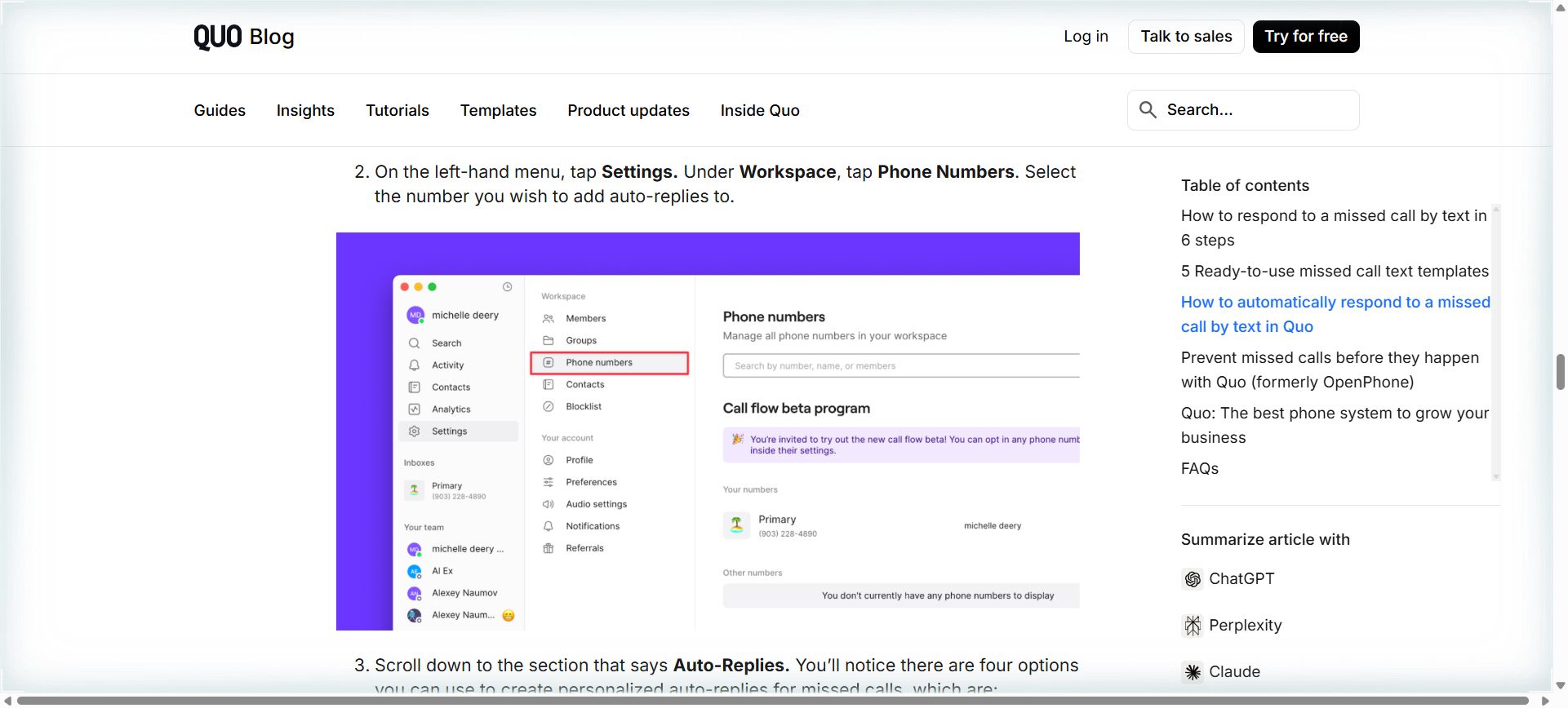
- Log into your business line dashboard. Navigate to Settings > Automations (or Rules/Workflows depending on your provider). Do not use personal carrier settings. Business VoIP platforms allow conditional triggers; personal lines do not.
- Create a new automation rule. Set the trigger to “Missed Call” or “No Answer after 4 rings.” Do not limit it to “After Hours.” Field workers miss calls during business hours too. Dispatchers miss calls during vendor hold times. The trigger must fire whenever the line rings out.
- Configure the action. Select “Send SMS” as the response method. Voice-to-text or email follow-ups introduce too much latency. Text lands in the primary notification layer on modern smartphones.
- Paste the exact template below. Keep it under 160 characters to avoid MMS conversion, carrier filtering, or preview truncation:
Thanks for calling [Business Name]. We’re on a job and can’t grab the phone right now. Tap here to book your slot directly or reply with your name and issue—we’ll text you back within 10 mins: [Direct Booking Link]
- Attach a clean scheduling link. Use a direct URL from Calendly, Acuity, Housecall Pro, or ServiceTitan. Strip UTM parameters or tracking tags that break SMS link previews. If your booking platform requires a phone number or email to proceed, ensure the form auto-fills from the SMS link where possible.
- Set delivery constraints. Limit to 1 SMS per unique caller per 24 hours. This prevents spam flags, keeps your carrier reputation clean, and ensures the message feels like a courtesy, not a broadcast.
- Add an opt-out footer. Append
Reply STOP to opt out.to comply with TCPA guidelines. Most modern VoIP platforms handle this automatically, but verify it’s active in your compliance settings. - Test it end-to-end. Call your business line from a personal number. Let it ring out. Verify the SMS arrives within 8–12 seconds. Open the link on mobile. Submit a test booking. Check that it routes to the correct calendar and triggers your internal dispatch notification.
- Monitor and adjust. Review delivery logs weekly. If you see failed deliveries, check for carrier filtering (common with shortened URLs or excessive punctuation). If conversion is low, swap the booking link for a direct callback request form:
Reply with your name and preferred time. We’ll call you within 15 mins. - OpenPhone ($15/user/month, checked 2026-08-02): Cleanest native missed-call automation. No true free tier, but offers a 7-day trial with full SMS features. Gotcha: Disable “Smart Replies” in settings to prevent carrier spam filters from flagging your number. SMS limits are generous, but international routing requires manual approval.
- RingCentral ($20/user/month, checked 2026-08-02): Enterprise-grade routing with auto-responder rules. Offers a basic free tier for calling only; SMS requires a paid tier. Gotcha: The automation builder sits under “Admin Console > Rules.” You must manually order rules to prevent conflicts with call queues or ring groups. Setup takes 3–4 minutes instead of 60 seconds.
- Grasshopper ($28/user/month, checked 2026-08-02): Simple virtual numbers with auto-text features. 7-day trial only; no free tier. Gotcha: SMS delivery can lag 30–90 seconds on their legacy infrastructure. Fine for low-volume trades, but risky for high-intent service leads where response speed dictates conversion.
That’s it. No API keys. No developer tickets. No monthly SaaS bloat. Just a toggle, a text string, and a direct link. Your system now acts as a digital receptionist that works while your crew is under a sink, on a roof, or in a parts run.
Tools Comparison
Pricing checked 2026-08-02. Not every platform handles this workflow cleanly. Here’s how three common options stack up for this specific implementation:
If you’re running a lean team, OpenPhone’s trigger-action workflow is a fast path to deployment. If you’re already locked into RingCentral, route the automation through their “Auto-Replier” and test rule ordering. Grasshopper works if you prioritize number portability over delivery speed, but expect to monitor delivery rates more closely.
ROI
What do you actually get back when you flip this switch?
Revenue recovery: Even capturing 30% of previously missed calls adds $3,000–$4,500 to monthly top-line without a single additional marketing dollar. You’re not buying leads. You’re intercepting demand you already paid to attract.
Time reclamation: Dispatchers and front-desk staff stop playing phone tag. You eliminate 4–6 hours weekly spent on callback triage, voicemail transcription, and scheduling conflicts. That’s 200+ hours annually redirected toward quoting, parts ordering, or technician routing.
Operational predictability: When every caller gets immediate acknowledgment, your scheduling calendar fills itself. You stop chasing ghosts and start managing confirmed appointments. Your techs see a tighter, more realistic daily route instead of padded windows that collapse when no one shows.
Stress reduction: This is the unquantified metric that actually changes company culture. Operators stop treating missed calls as personal failures and start treating them as automated handoffs. You remove the anxiety of “what if I lose a $2k job because I was on hold with a supplier?” The system handles the acknowledgment. Your team handles the execution.
Call to Action
You don’t need another software subscription. You don’t need a consultant to audit your call routing for three weeks. You need to flip the switch you already have. Why pay for another tool when your business is simply leaking money through settings you forgot to turn on?
Grab the free setup guide, exact message templates, carrier compliance checklist, and troubleshooting matrix for SMS delivery failures here: https://www.dgfcorporations.com/fixes/missed-calls-after-hours/
Deploy it before your next shift change. Collect the calls you’re already earning.